
Know where your printer fleet is exposed.
Discover network printers, assess their security posture, and preview configuration changes from one self-hosted console. Confirmed failures and unknown evidence stay clearly separated.
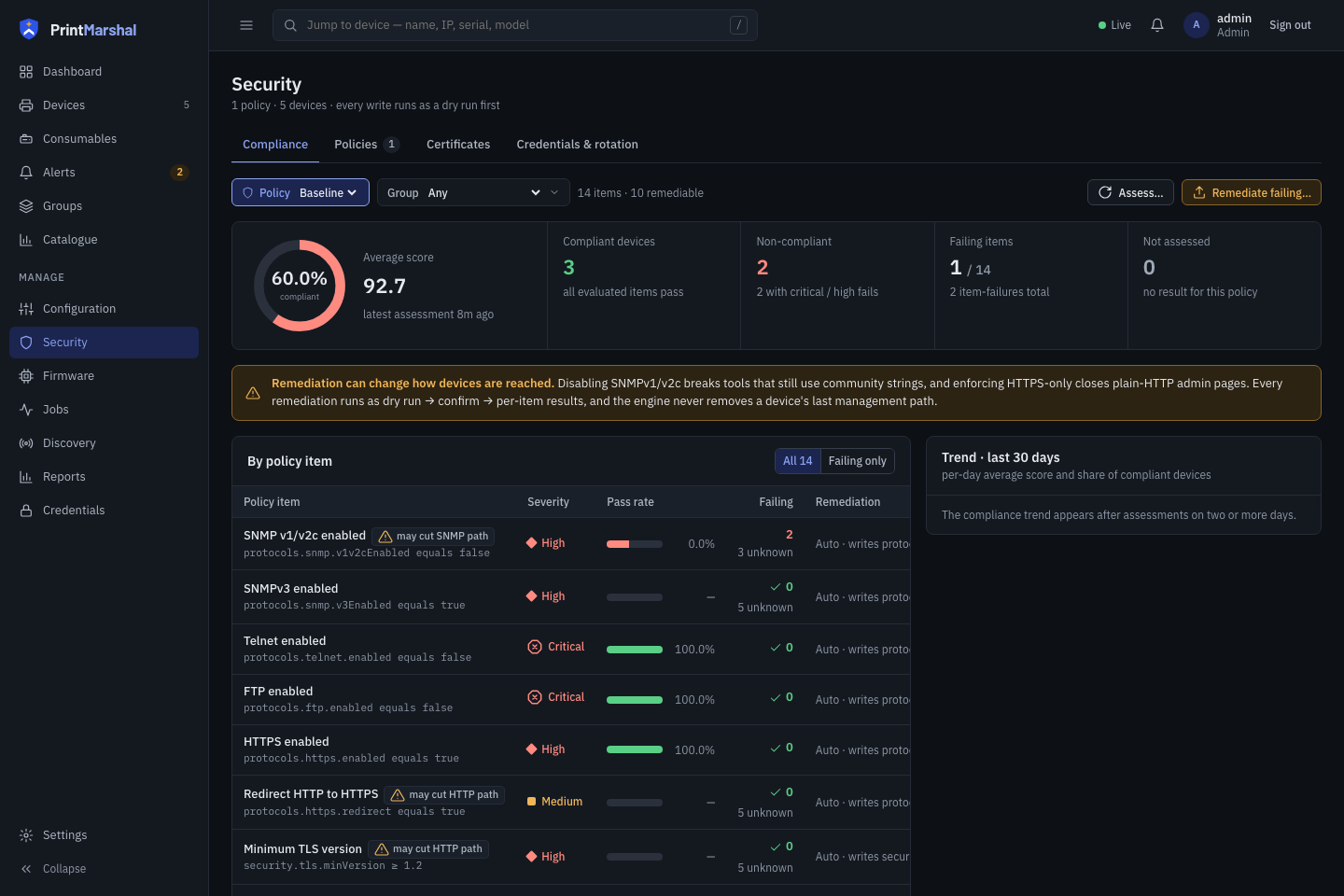
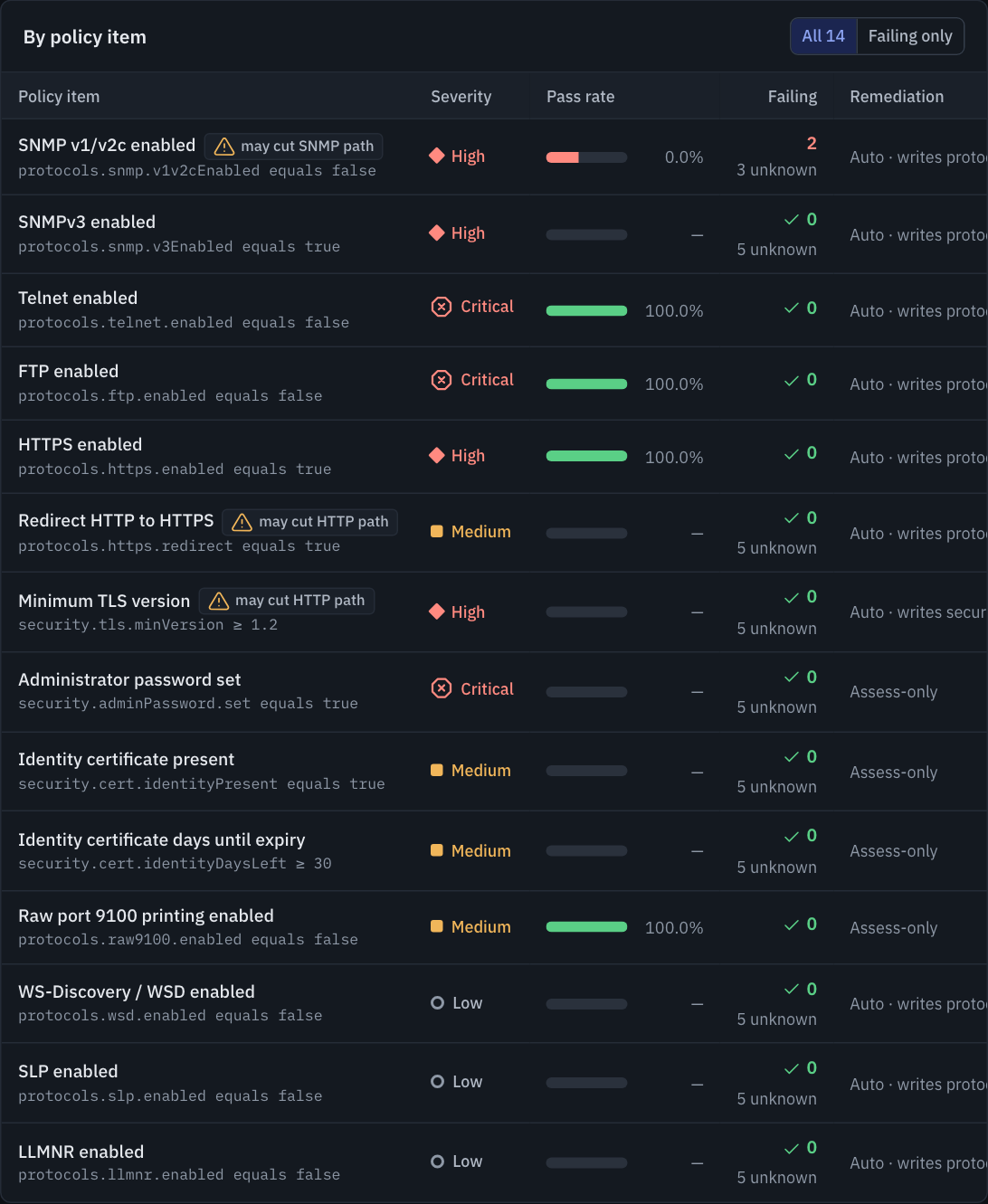
The built-in 14-item Baseline policy scores observed settings (× Fail ✓ Pass) while keeping unreadable vendor settings visible as ? Unknown rather than assuming compliance.
pm-sim
From fleet discovery to verified configuration changes.
Explore how PrintMarshal discovers printers, evaluates security posture, separates research coverage from live driver evidence, and previews configuration changes. All captures come from the shipped application running against pm-sim.
1. Discover printers and reconcile identity
Scan CIDR ranges, IP lists, or passive multicast announcements. PrintMarshal polls standard SNMP MIBs and IPP attributes for identity, supply levels, page counters, and firmware versions.
- Identity matching: Reconciles by serial, UUID, MAC, and IP while flagging conflicts when another printer reuses an address.
- Protected operator fields: Display names, locations, and asset tags are never overwritten by polls.
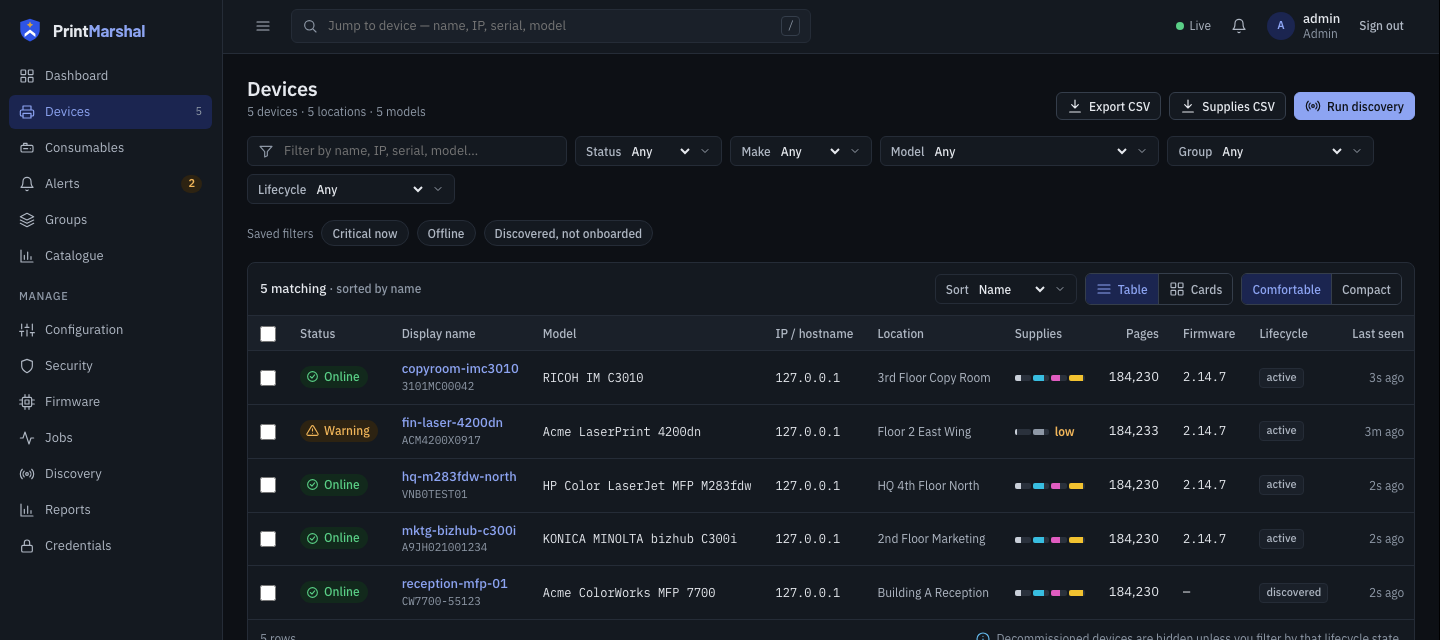
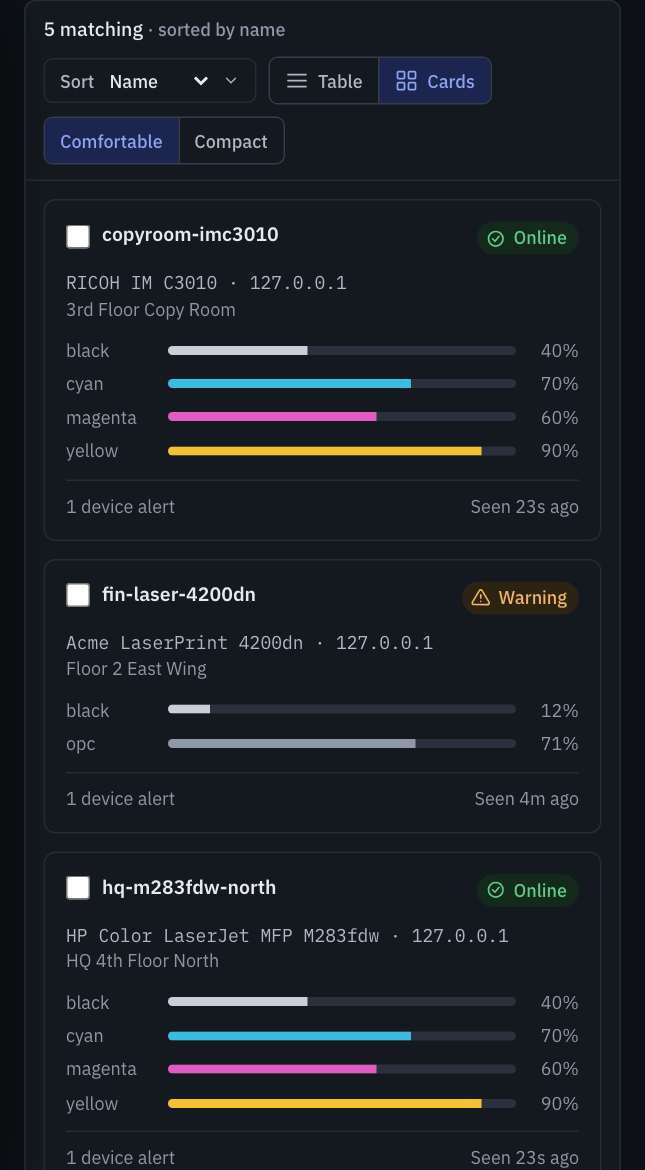
Filter by status, make, model, or lifecycle state and export inventory or supply CSVs.
2. Assess fleet posture against the Baseline policy
Evaluate printers against the 14-item Baseline policy or custom rules covering legacy ports, SNMPv1/v2c exposure, TLS versions, and certificate validity.
- Honest scoring: Unreadable settings report as
unknownand are excluded from the score denominator rather than counted as pass. - Port & TLS probes: Checks management/print ports and inspects TLS handshakes on HTTPS and IPPS.
Shows passing, failing, and unknown rule counts side by side so blind spots stay visible.
3. Inspect per-device findings and certificates
Drill into any printer to inspect failed checks, settings unreadable over standard MIBs, and TLS certificates presented by the device.
- Observed vs expected: Displays the live value reported by the printer alongside the policy requirement.
- Certificate inventory: Tracks observed TLS certificates, expiry alerts, and certificates enrolled via PrintMarshal.
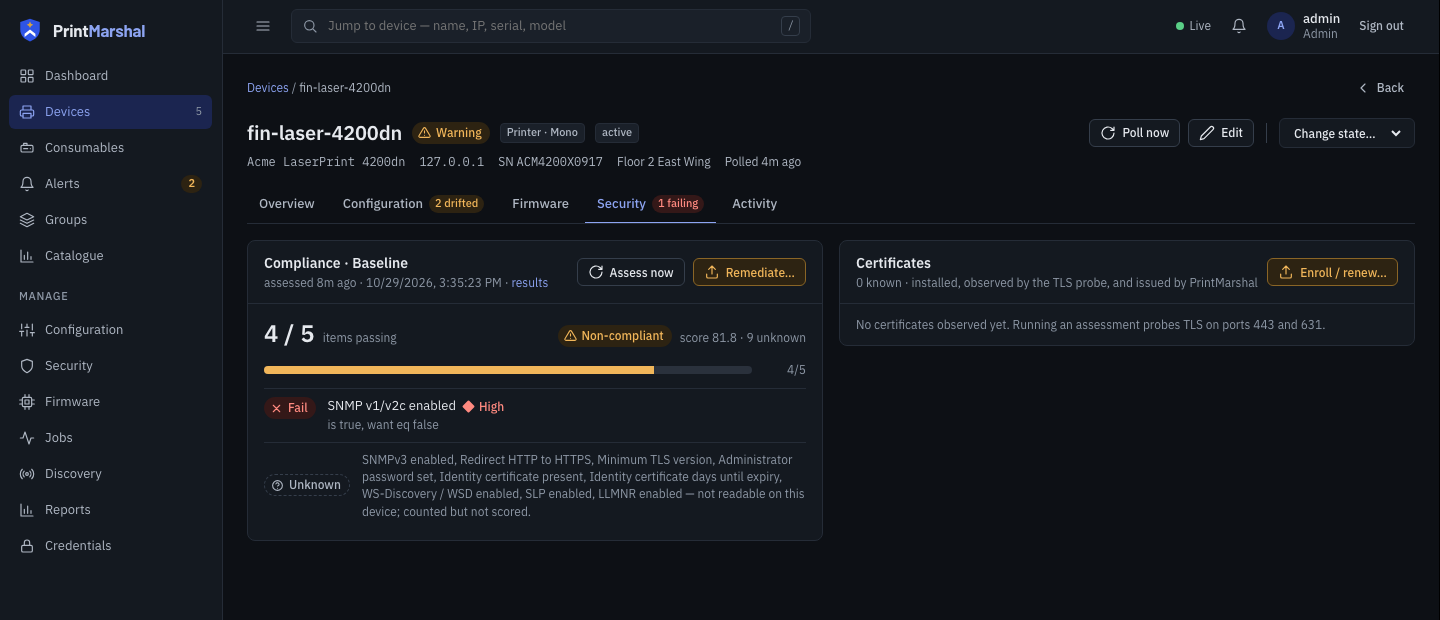
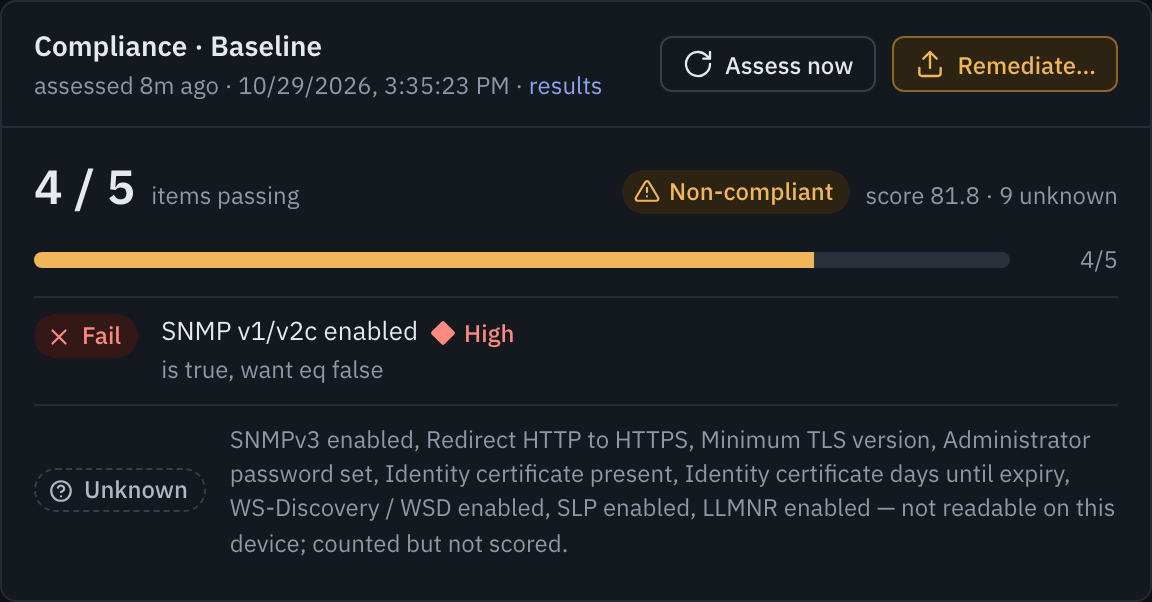
Lists the failing check (SNMP v1/v2c enabled: is true, want eq false) separately from the 9 unknown items.
4. Separate live driver support from research
PrintMarshal includes a 15-vendor, 495-model research catalog, but never claims a model is supported solely from vendor documentation.
- Observed provenance: Shows which operations answered live on the device over SNMP or IPP.
- Unsupported reasons: Explains why firmware pushes or vendor security writes require a model-specific driver.
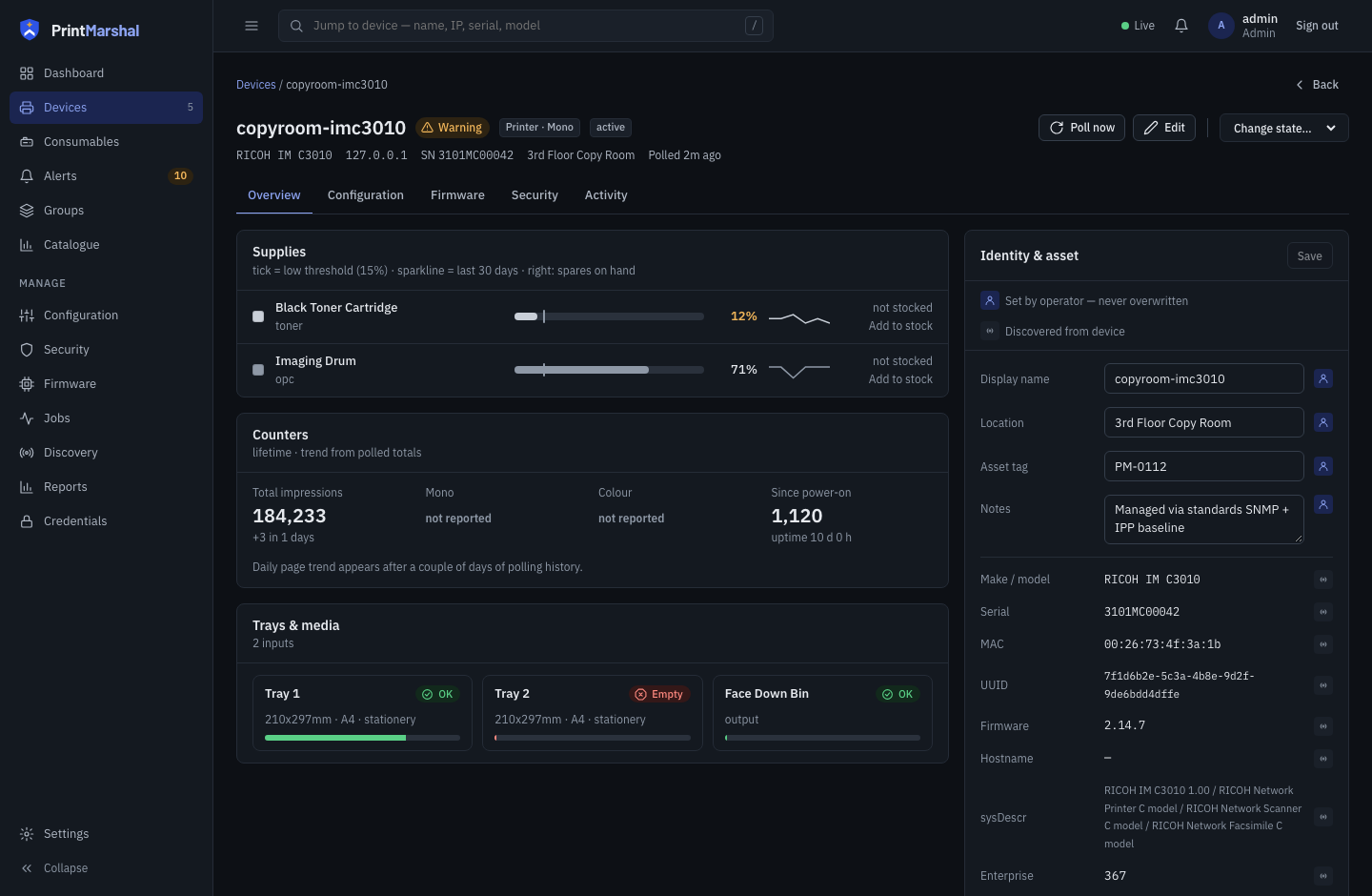
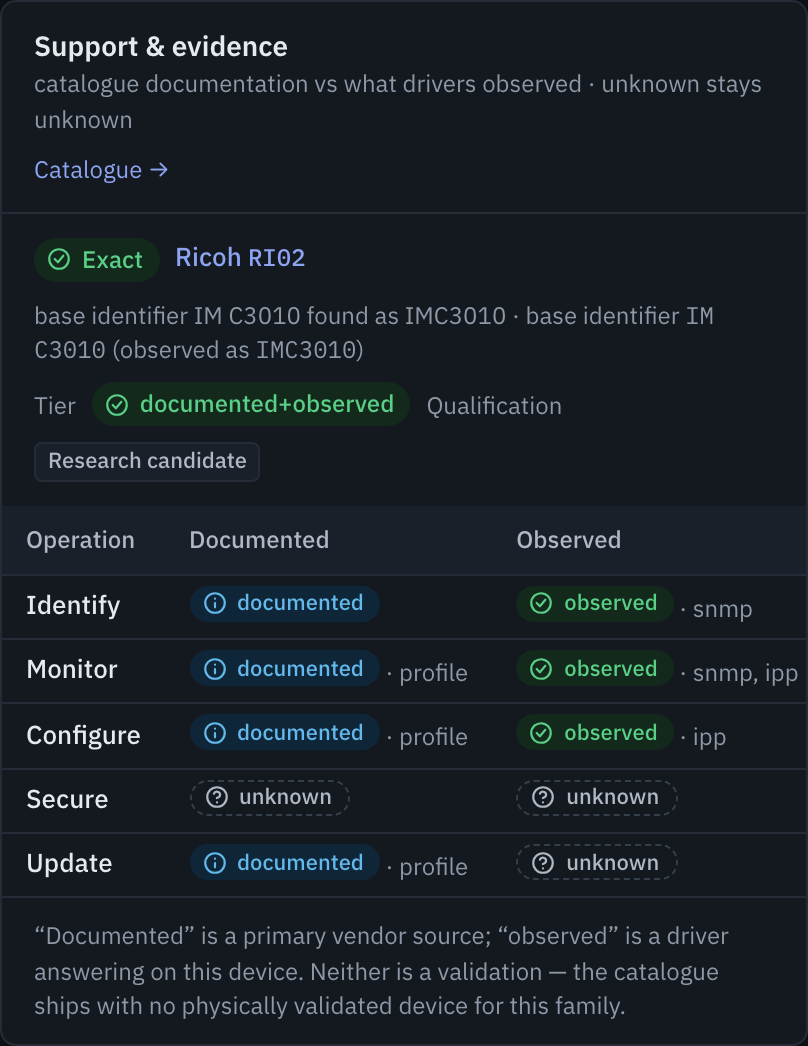
Distinguishes live SNMP/IPP observations from vendor research and explains blocked operations.
5. Preview diffs in dry-run, then verify writes
Dry-run reads live values from target printers and computes a setting-by-setting diff without writing to hardware.
- Read-back verification: Re-reads changed keys after apply to separate
verifiedoutcomes from unverifiedacceptedwrites. - One-click revert: Saves prior values before writing so verified changes can be rolled back.
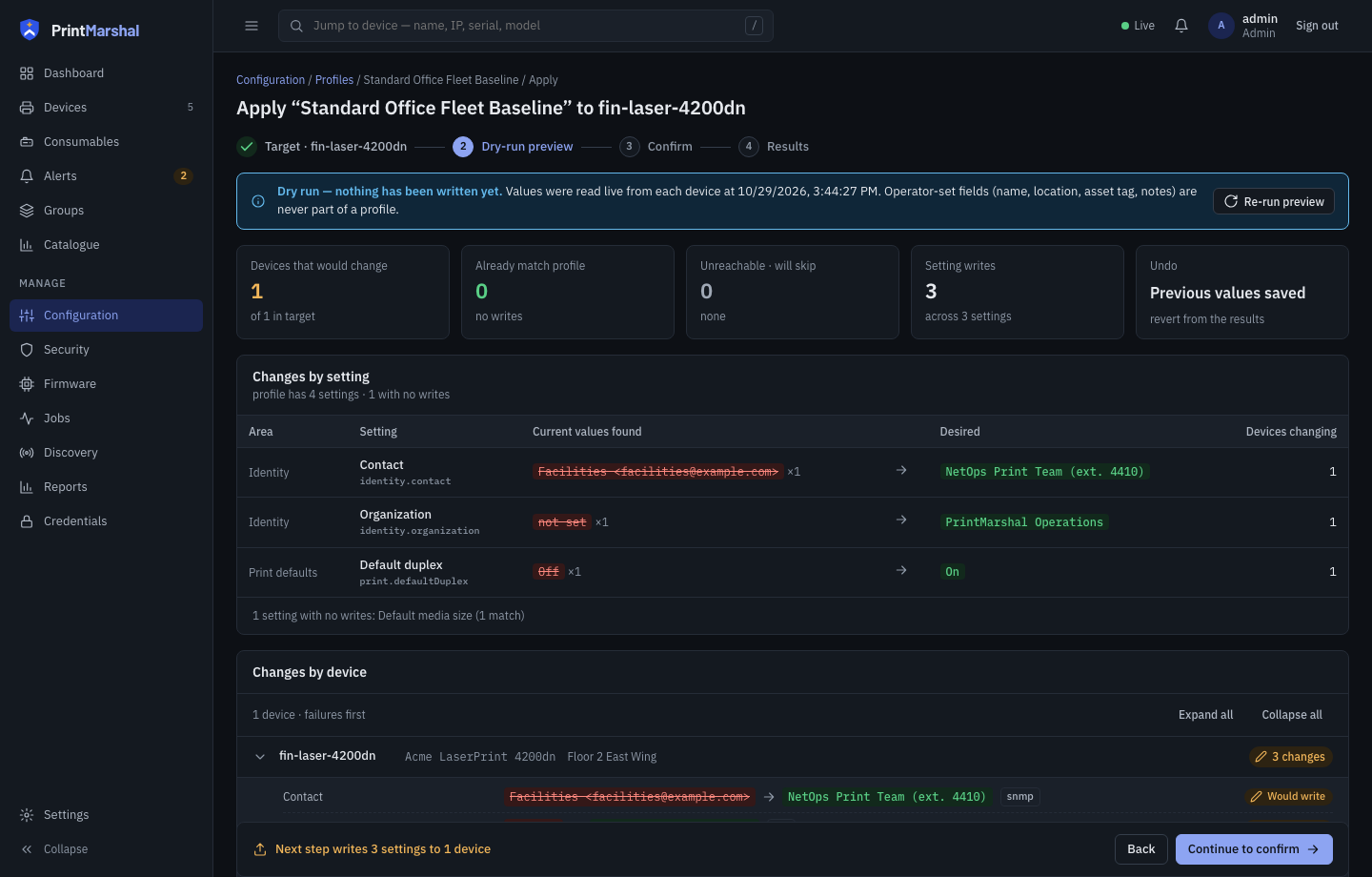
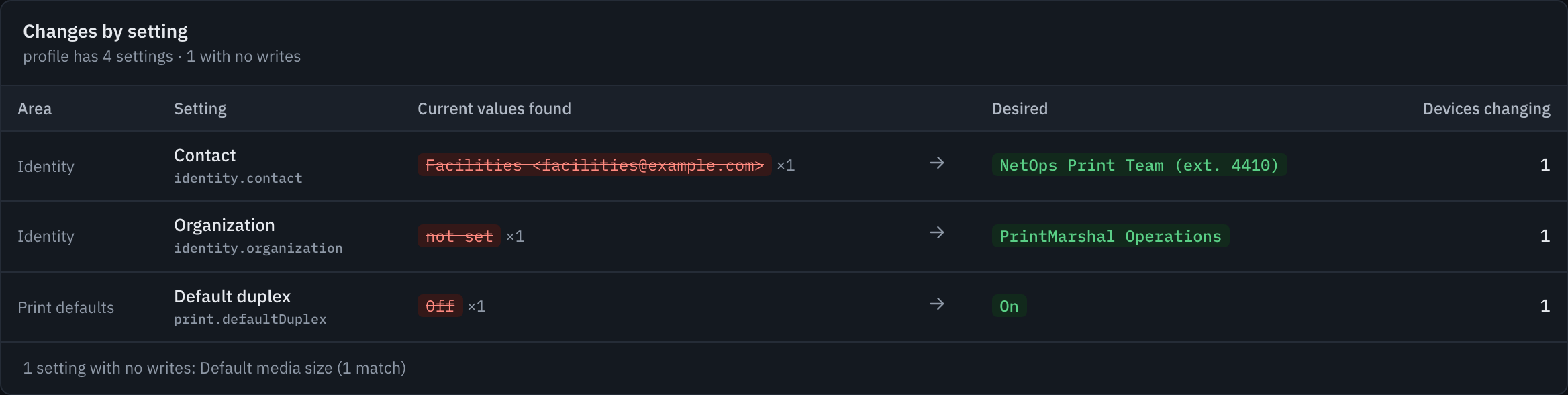
Shows which settings will change, which driver writes them, and saves prior values for rollback.
How PrintMarshal turns a printer poll into a verified action.
public), proving cleartext SNMP is enabled (× Fail), while disabling it requires a vendor write driver.
× Policy Fail · High
fin-laser-4200dn
Polled via standard SNMP and IPP drivers.
SNMPv2c answered
Responded to sysObjectID.0 over SNMPv2c (v1v2cEnabled = true).
Baseline rule failed
Observed true violates eq false (High severity, weight 2.0).
Rotate or disable
Disable SNMPv1/v2c via printer web UI or vendor driver, or rotate community string.
Technical trace details
protocols.snmp.v1v2cEnabled
Rule: eq false (weight 2.0)
Write contract: driver.SecurityWriter
? Unknown instead of assuming compliance.
? Unknown Evidence
fin-laser-4200dn
Polled via standard SNMP and IPP without private MIBs.
No standard OID
Neither RFC 3805 nor IPP exposes password status; key omitted from snapshot.
Excluded from score
Marked unknown and excluded from the denominator—never counted as pass.
Verify via web UI
Check the printer console directly or add a vendor driver that reads password state.
Technical trace details
security.adminPasswordSet
Rule: eq true (weight 3.0)
Rotation key: security.adminPassword (WriteOnly)
✓ Pass).
✓ Policy Pass
fin-laser-4200dn
Evaluated during an active security assessment.
Ports & TLS probed
Telnet (23) and FTP (21) refused connections; HTTPS (443) and IPPS (631) answered.
4 of 5 readable pass
Telnet/FTP disabled and HTTPS/IPPS enabled match the Baseline policy.
Monitor drift & expiry
Tracks configuration drift across snapshots and alerts on approaching TLS expiry.
Technical trace details
protocols.telnet.enabled, protocols.https.enabled
Probes: security/portprobe, security/tlsprobe
Discover printers. Investigate risk. Review changes.
Every workflow is built on standard network protocols, explicit evidence tracking, and non-destructive previews. Explore the full Features and Security breakdown for protocol and catalog details.
1. Discover printers and monitor fleet health
Build an accurate inventory without agents. PrintMarshal combines active CIDR/IP scanning with passive mDNS and WS-Discovery listeners, polling standard Printer-MIB, Host-Resources-MIB, and IPP attributes.
Track toner and drum levels with 30-day sparklines, page counters, tray status, and rate-limited SNMP traps while keeping operator-assigned names, locations, and asset tags separate from device-reported fields.
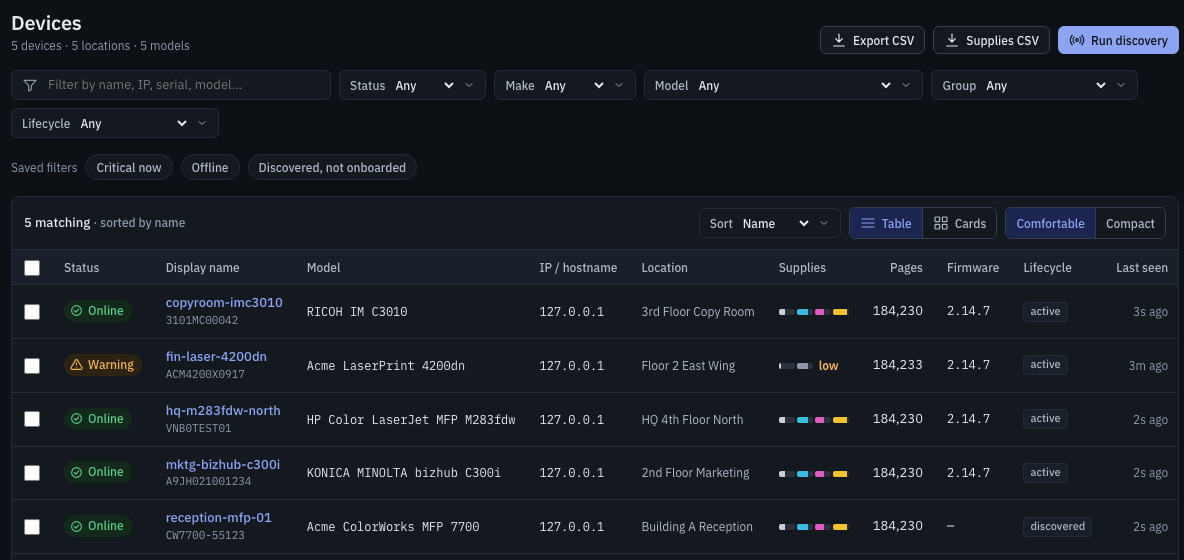
Normalizes status, supply levels, and page counters across SNMP and IPP without overwriting operator metadata.
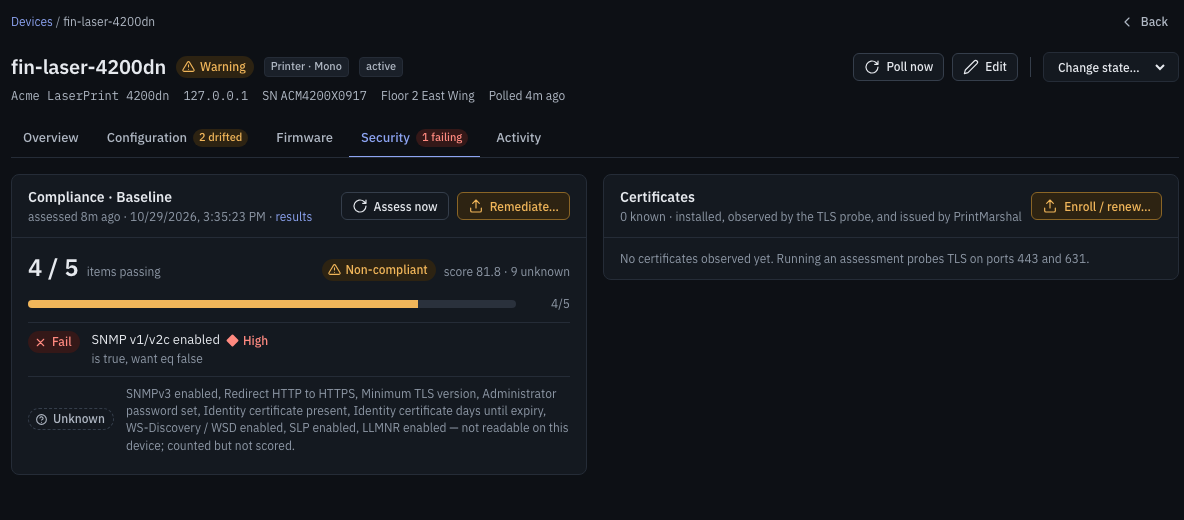
Separates confirmed failures from unreadable settings and inspects TLS certificates on ports 443 and 631.
2. Investigate security risk and TLS certificates
Evaluate devices against the 14-item Baseline policy or custom weighted rules across PrintMarshal's 84-key canonical settings catalog (43 security-tagged keys). Active probes inspect open ports and TLS handshakes.
Generate CSRs and enroll device certificates through the built-in CA, EST, or SCEP, with automated warnings at 30 days and critical alerts at 7 days before expiry.
3. Preview configuration changes and verify writes
Snapshots record setting values, reporting drivers, and writability. Before applying a configuration profile, dry-run reads live values from every target printer and displays the exact diff.
When you apply changes, PrintMarshal saves prior values for one-click revert and performs a read-back poll to confirm whether the printer verified the new value or merely accepted the request.
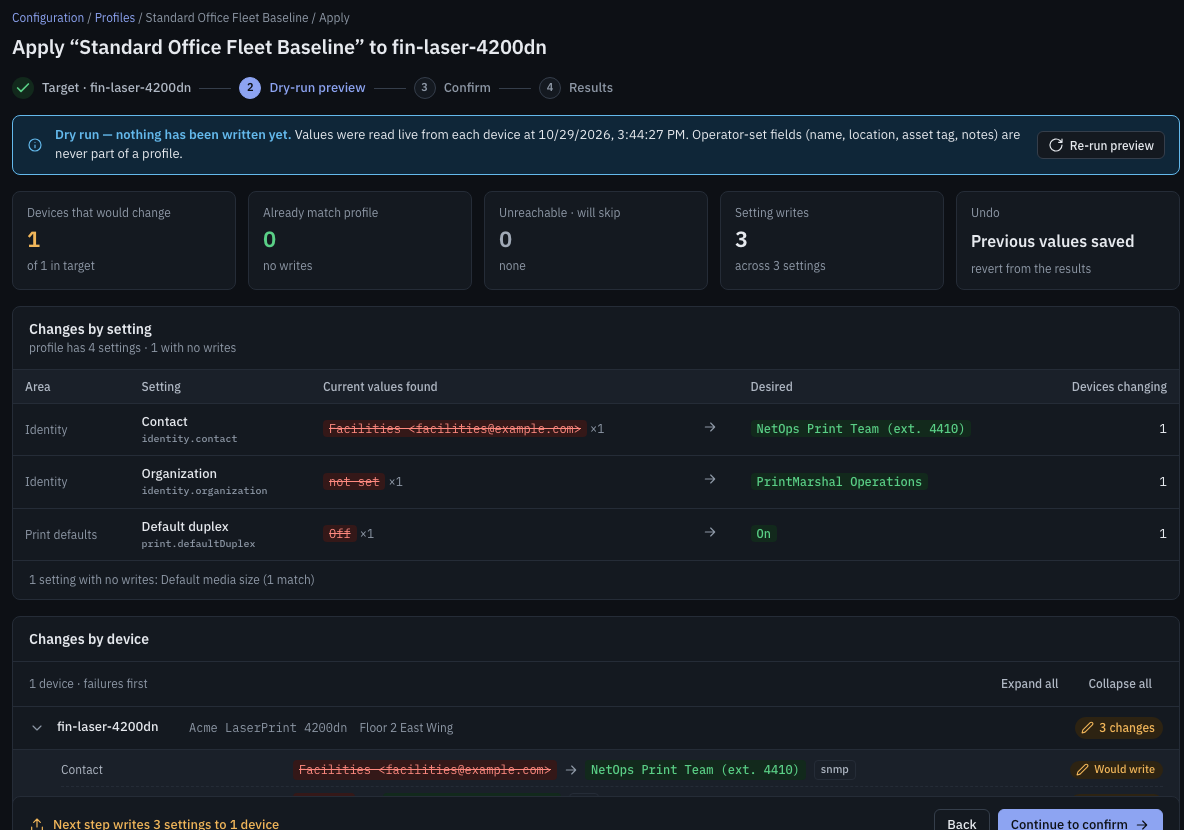
Every profile apply starts with a live dry-run diff and records verified or accepted write history for audit and rollback.
What works with your printers today.
PrintMarshal separates features that work out of the box over standard SNMP and IPP from operations that depend on device writability or vendor-specific drivers.
Works via standard protocols
Read-only discovery and supply/counter monitoring, 14-item Baseline auditing (pass / fail / unknown), port/TLS probing, CSR & CA/EST/SCEP enrollment, RBAC, and SIEM export.
Depends on printer support
Configuration profiles (dry-run diff, read-back, rollback) write MIB-II identity fields (sysName, sysLocation, sysContact) and writable IPP attributes only where the printer accepts them.
End-to-end on pm-sim
The firmware repository stores SHA-256 verified images; delivery over POST /fw-sim is wired only for loopback simulator targets.
Extension points ready
Physical firmware pushes, installing certificates on printers (CertificateInstaller), and vendor security settings require a vendor driver.
Research, not validation: the 15-vendor, 495-model research catalog documents vendor routes; 0 models ship physically validated. PrintMarshal manages devices, not print jobs.
Open source. Self-hosted. Built to extend.
Deploy PrintMarshal as a single Go binary or container on your own management VLAN with zero cloud dependencies or telemetry.
Self-hosted & encrypted Single Binary
Embeds the React UI and runs with embedded SQLite or PostgreSQL. Device credentials and CA keys are encrypted at rest with AES-256-GCM (PM_SECRET_KEY), and an append-only audit log exports to RFC 5424 syslog or SIEM collectors.
Comprehensive operational Wiki Documentation
Every API route, policy operator, environment variable, backup script, and local CUPS print-provider setting is documented directly against the repository source code.
Contribute walks & drivers Extensible
Help expand physical device coverage without risking production printers: contribute sanitized .snmp walk fixtures for pm-sim or implement Go driver interfaces (ConfigWriter, SecurityWriter, CertificateInstaller).
Evaluate locally with the built-in simulator.
Start pm-sim and PrintMarshal on 127.0.0.1 to test discovery, Baseline security assessments, and configuration dry runs before connecting to a lab subnet.